
What an Instant Quote is
An Instant Quote is an estimated price range, not a fixed quote. It gives a buyer a sense of what an event at your venue is likely to cost, shown as a range rather than a single figure.
Buyers only see it after they've entered their contact details and an event brief — so by the time an estimate appears, they've already told us what they're planning. It's right within the range 98% of the time on our data.
How the estimate is built
Instant Quotes are generated by our pricing engine, which combines:
- Your own historic quotes for similar events
- Comparable venues — we refine the estimate using data from lots of similar venues
- The event itself — seasonality, event type, guest numbers and dozens of other variables from the buyer's brief
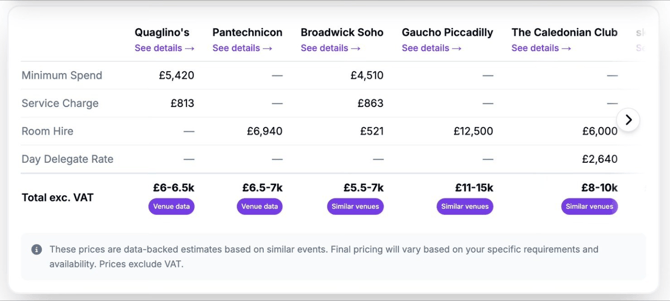
Each estimate carries a source badge so buyers can see what it's based on:
- Venue data — the estimate is drawn from your own quotes
- Similar venues — the estimate is drawn from comparable venues (used when we don't yet have enough of your own quote history)
The more real quote history we have for your venue, the more your estimates lean on your own numbers rather than comparable venues.
How to influence your Instant Quotes
You don't edit the estimate directly, but you do shape it:
- Add Private Pricing Notes. This is the main lever. If your venue has pricing rules we can't see from your public listing — weekend discounts, midweek surcharges, off-peak rates, package thresholds — write them in Private Pricing Notes. They're never shown publicly and are used only to sharpen your estimates.
- Keep your public pricing up to date. Accurate package prices, room hire rates and minimum spends on your listing all feed the estimate.
- Respond to and quote on enquiries. Your real quotes are the single best input — the more you quote, the more the engine learns your actual pricing and the more it relies on your own data rather than comparable venues.

Why this matters
A buyer who can see a realistic ballpark before they enquire is a buyer who enquires with their eyes open. That means fewer price-mismatched enquiries, and the ones that do reach you are already comfortable with roughly what you cost — so they convert better.
Paired with Qualification Criteria — which filter on fit (size, event type, your rules) — Instant Quotes filter on price expectation. Together, they're the biggest single improvement to enquiry quality we've ever shipped.
FAQ
Do I have to set Instant Quotes up? No. They're generated automatically for every venue from your existing data. You don't switch them on or build them.
Is the Instant Quote a binding quote? No. It's an estimate shown as a range to help buyers gauge cost at the research stage. You still quote and contract as you always have — the Instant Quote doesn't commit you to a price.
Where do buyers see it? In a few different places — there are several ways a buyer can enquire — but always after they've entered their contact details.
Can I see my own Instant Quotes, or preview them? There's nothing to preview, because each estimate is tailored to a specific enquiry — it's generated from that buyer's brief. If you want to see one in action, you can run a test enquiry through your own live profile page.
Can I turn Instant Quotes off, or set my own range? No. Instant Quotes are always on and generated automatically for every venue. The only way to shape them is through your Private Pricing Notes.
Why does my estimate say "Similar venues" instead of "Venue data"? It means we don't yet have enough of your own quote history, so we're estimating from comparable venues. As you quote on more enquiries, the badge moves towards "Venue data".
My estimate looks too high or too low — how do I fix it? Add or update your Private Pricing Notes with the context behind your pricing, keep your public pricing current, and keep quoting on enquiries. All three feed the engine and sharpen the range over time.
Will buyers see my actual quotes or margins? No. Buyers see only the estimated range and its source badge — never your individual historic quotes, costs or margins.