
Qualification Criteria can be set in two places:
- Venue level - your default rules, applied to every space in the venue. Found in the Qualification Criteria section of your venue's Venue Details page.
- Space level - rules for an individual space. Found in the Qualification Criteria section of that space's details page, under Spaces > [Your Space].
Important: Space-level criteria override venue-level criteria for that space. If your venue defaults to a minimum of 50 guests but one of your spaces is a small boardroom, write a lower minimum on that space - the boardroom will use its own rule, not the venue default.
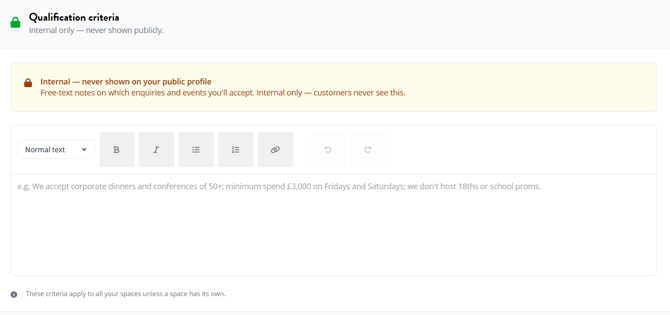
How it works
- Go to Venue Details in the sidebar
- Scroll down to the Qualification Criteria section
- Write the rules you want enquiries filtered against, in plain English
- Scroll to the bottom of the page and click Update Venue Details to save
- If you want different rules for a specific space, repeat the same steps on that space's details page under Spaces > [Your Space]
Criteria take effect immediately. New enquiries that don't meet your rules are automatically filtered out across every channel.
What to write
Qualification Criteria is a free text field. Write the rules you want our system to apply when an enquiry comes in, the way you'd explain them to a new staff member. A few examples:
- "Minimum 30 guests. We don't take any enquiries below that."
- "No weddings or 18th birthdays. We're a corporate-only venue."
- "Minimum budget £5,000 for evening hire, £2,500 for daytime."
- "We only do Christmas parties between Tuesday and Thursday in December. Friday and Saturday slots are reserved for our regulars."
- "No alcohol-only events — must include a catered element."
Specific is better than vague. "We're selective about events" doesn't help us; "We only accept corporate events of 50+ guests, no socials" does.
The most common rules venues set are around minimum guest count, event types they accept or don't, and minimum budget — but you can write anything that genuinely shapes the enquiries you want.
Pair with Instant Quotes
Qualification Criteria filter on fit (size, event type, the rules you've written).Instant Quotes filter on price expectation by showing buyers an indicative range before they enquire, so the enquiries that reach you already know roughly what you cost.
Used together, the enquiries you receive are pre-qualified on both fit and price. That's the biggest single improvement to enquiry quality we've ever shipped.
Best practice
Be realistic, not aspirational. Write the rules for the smallest event you'd actually take, not your ideal event size. Too restrictive a rule cuts out good business; too loose brings in mismatches.
Use space-level overrides for any space that's different from your venue norm. A venue with a 200-seat theatre and a 10-person boardroom shouldn't have the same minimum guest rule for both. Set the venue default to whatever your typical space needs, then write different rules on the outliers.
Be clear about which event types you'll take. It's tempting to write only the events you ideally want, but doing that filters out enquiries that might still convert. Write the rules around what you'd genuinely accept, not just what you'd prefer.
Don't worry about phrasing perfectly. Our system reads plain English. Write it the way you'd brief someone else on the team.
Review your criteria quarterly. If you're getting too few enquiries, your rules may be too tight. If you're getting too many mismatches, they may be too loose. The Growth Dashboard helps you spot the pattern.
FAQ
Will I still see enquiries that don't meet my criteria? No. Filtered enquiries are routed elsewhere — they don't appear in your enquiry feed at all.
Can I change my criteria at any time? Yes. Edit the text box, scroll to the bottom and click Update Venue Details to save. The new rules apply from the next enquiry onwards. Existing enquiries are not retrospectively filtered.
What happens if I have venue-level criteria but no space-level criteria? The venue rules apply to every space. Space-level rules are only used when you write them.
What happens if I have space-level criteria but no venue-level criteria? The space uses its own rules. Other spaces in the same venue have no filtering applied.
Do qualification criteria apply to Concierge enquiries too? Yes. The rules apply across every channel a lead can come from — Concierge, Deep Research and the website.
How clever is the matching? Our system reads your rules in context and applies them sensibly — so "minimum 30 guests" filters out a 25-guest enquiry, and "no weddings" filters out wedding briefs even if the buyer doesn't use the word "wedding". You don't need to write rules in a specific format.
Are buyers told why their enquiry was filtered? -No, they see the message “was unable to accommodate your enquiry”,