
Where to find it
Private Pricing Notes can be set in two places:
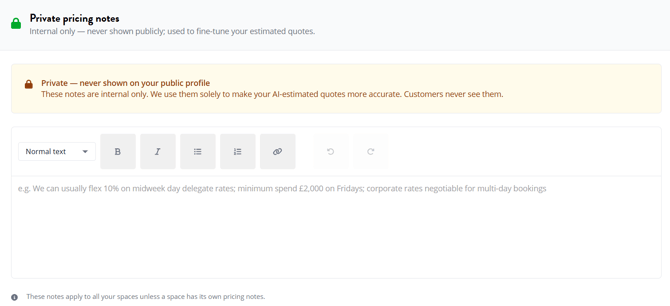
- Venue level — context that applies across your whole venue. Found in the Private Pricing Notes section of your venue's Venue Details page.
- Space level — context for an individual space. Found in the Private Pricing Notes section of that space's details page, under Spaces > [Your Space].
Important: Space-level notes override venue-level notes for that space. If you have a 50% weekend discount that only applies to one of your spaces, put it on that space — not the venue default.
How it works
- Go to Venue Details in the sidebar
- Scroll down to the Private Pricing Notes section
- Write the pricing context you'd want our estimate to factor in
- Scroll to the bottom of the page and click Update Venue Details to save
- If you want different notes for a specific space, repeat the same steps on that space's details page under Spaces > [Your Space]
Your notes are used the next time we generate an Instant Quote for your venue. Buyers see a more accurate estimate; you stay in control of what's public.
Why this matters
Instant Quotes show buyers an indicative price range the moment they're interested in your venue. The estimate is built from your historic quotes, refined with similar venues, and factors in seasonality, event type and dozens of other variables. It's right within that range 98% of the time on our data.
But there are things we don't know. If your venue has pricing rules we can't see from public data — weekend discounts, midweek surcharges, off-peak rates, package thresholds — your estimates may be slightly off. Private Pricing Notes are how you tell us, without telling the world.
The more accurate the estimate, the better-qualified the enquiries that reach you.
What to write
Think of Private Pricing Notes as a quick note to our pricing engine. A few examples:
- "We do 50% off room hire at weekends because we're in the City and have low weekend demand."
- "Minimum spend of £5,000 for evening hire after 6pm on Fridays and Saturdays."
- "Catering packages discount by 15% for bookings over 100 guests."
- "December room hire is at peak rates — typically 25–30% higher than the rest of the year."
Specific is better than vague. "We're flexible on price" doesn't help us; "Room hire is negotiable down to £2,500 for non-profit bookings" does.
Best practice
Cover the things that aren't on your public price list. If a rule is already public on your venue page, we already know about it. Use this space for the context that wouldn't otherwise reach our pricing engine.
Use space-level notes for space-specific rules. A venue-wide weekend discount goes on the venue. A "this room only" rule goes on the space.
Update notes when your pricing structure changes. Notes left in place after a price restructure can make estimates less accurate, not more.
Don't worry about phrasing perfectly. The notes are read by our pricing engine, which handles plain English well. Write it the way you'd explain it to a new staff member.
FAQ
Will buyers ever see what I've written? No. Private Pricing Notes are never shown on the public website, in Deep Research results, or in any external communication. They are read only by our pricing engine to refine Instant Quote estimates.
Will my account manager see them? Private Pricing Notes are visible to HS internal teams
Do I have to write any? No. Private Pricing Notes are optional. If you don't write any, Instant Quotes are still generated from your historic data and similar venues. They just won't have the additional context you could provide.
How do I know if my notes are improving the estimate? Instant Quote estimates use a confidence badge that shows whether the estimate is based on your own quote data or comparable venues. As your notes refine the engine, the estimate stays within the right range more consistently — you can spot-check by comparing the public estimate to what you'd actually quote.
Can I write notes for one space but not others? Yes. Notes are optional at every level. A space with notes uses those notes; a space without notes falls back to the venue-level notes (or no notes, if the venue level is also blank).
Is this the same thing as my public pricing on the listing? No. Your public pricing — package prices, room hire rates, minimum spends — is what appears on the website for buyers to see. Private Pricing Notes are private context that only refines the Instant Quote estimates. The two are separate fields.