
How it works
- Go to Growth > Venue Promotions in your sidebar
- Select your venue from the Your Venues tabs at the top
- Click the expand arrow next to your venue to see the tag grid
- Browse or search the available tags
- Select up to 3 tags that match your venue
- Click Save Changes
Your tags take effect immediately. You can change them at any time.
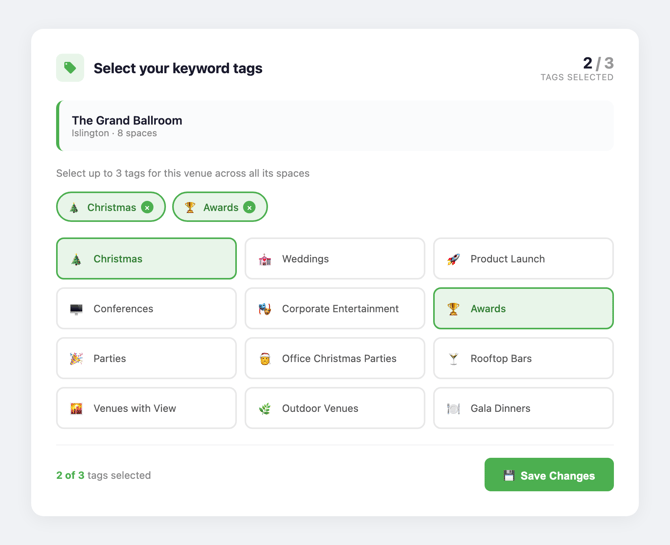
Available tags
Tags cover a wide range of event types and venue characteristics. Some examples:
- Event types: Christmas, Weddings, Conferences, Awards, Product Launch, Team Building, Private Dining, Meetings
- Venue features: Rooftop Bars, Venues with View, Outdoor Venues, Sustainable Venues, Dry Hire, Warehouse
- Formats: Large Conference Venues, Hybrid, Gallery Hire, Theatre Hire, Cinema Hire
Choosing the right tags
Your 3 tags are valuable. Choose them based on what event planners are actively searching for, not just what your venue can do. Bear in mind that popular tags are shared across more venues, which dilutes the boost for each one. Being strategic pays off. A few principles:
-
Go specific over generic. High-demand tags like "Conferences" are selected by many venues, which spreads the boost thinner. A more specific tag like "Large Conference Venues" or "Hybrid" will face less competition and give you a stronger boost for the right searches. Think about what makes your venue distinctive and pick tags that reflect that. The dashboard will flag it if you select a tag that's in high demand, so you can make an informed choice about whether to stick with it or switch to something less competitive.
-
Match your strengths. If your venue is known for its rooftop terrace, "Rooftop Bars" or "Outdoor Venues" will work harder than a generic "Meetings" tag.
-
Think seasonally. Event planners search for different things at different times of year. Consider swapping your tags to match:
- Q1 (Jan to Mar): Conferences, Away Days, Team Building
- Q2 (Apr to Jun): Summer, Product Launch, Outdoor Venues
- Q3 (Jul to Sep): Christmas, Awards, Gala Dinners (planners book Christmas parties months ahead)
- Q4 (Oct to Dec): Meetings, Private Dining, Networking
-
Optimise your profile. Update your descriptions and photos to match the event types you're promoting. Tags boost your visibility across category pages, search, Deep Venue Research and email campaigns, and that effect is stronger when your profile content reinforces the same themes.
FAQ
Can I change my tags at any time?
Yes. There's no lock-in period. You can swap tags as often as you like.
Do tags apply to all my spaces or just one?
Tags are set at the venue level, covering all spaces within that venue.
What if I only want to use 1 or 2 tags?
That's fine. Using fewer tags is better than choosing irrelevant ones just to fill the slots.
I have multiple venues on Prime. Do they share tags?
No. Each venue gets its own set of 3 tags. You can choose different tags for each venue.