
How it works
- Go to Growth > Sales Campaigns in your sidebar
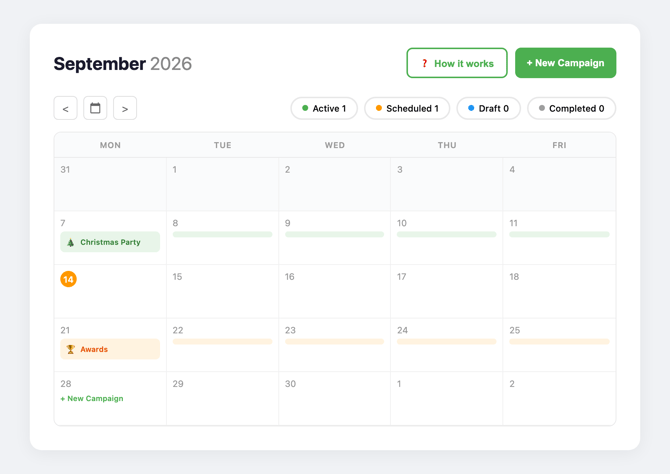
- Click + New Campaign (top right) or click on a week in the calendar
- Select your venue from the dropdown
- Choose the event type you want to target (e.g. Conference, Christmas Party, Wedding, Away Day)
- Pick your start date (campaigns always start on a Monday and run Monday to Friday)
- Click Create Campaign
Limits
- 1 campaign per month per venue
- 3 campaigns per year per venue
- You can see how many campaigns you have remaining when you create a new one
Tracking results
Once a campaign is live, you can track its performance using the status filters at the top of the calendar:
- Active: currently running
- Scheduled: booked for a future week
- Draft: started but not yet confirmed
- Completed: finished campaigns with results
Timing your campaigns for maximum impact
The key to a good ad campaign is timing. Event planners don't search for venues on the week of the event. They search weeks or months before. Plan accordingly:
Christmas parties: Run campaigns in September or October. By November, most planners have already booked.
Summer parties: Run campaigns in March or April. Outdoor venue searches peak in early spring.
Conferences and away days: These are booked year-round, but Q1 (January to March) sees a spike as companies plan their annual schedules.
Awards ceremonies: Run campaigns 6 to 8 weeks before awards season peaks in your sector.
Best practice
- Spread your 3 campaigns across the year rather than clustering them together. One in Q1, one in Q3 and one in Q4 gives you coverage across three peak periods.
- Match your event type to the season. A "Christmas Party" campaign in September will outperform the same campaign in February.
- Coordinate with your keyword tags. If you're running a Google Ads campaign for conferences, make sure "Conferences" is one of your active keyword tags that week too.
FAQ
Can I cancel a scheduled campaign? Contact your account manager to discuss changes to scheduled campaigns.
What happens when my campaign runs? Your venue appears as a promoted result in Google searches related to your chosen event type and location. Event planners who click through land on your Hire Space listing.
Can I see how many clicks my campaign received? Yes. Completed campaigns show impressions and click data in the calendar view.